Continuous SEO monitoring
Your last deploy changed your SEO. Nobody noticed.
A deploy removes a title tag, flips a canonical, or ships a stray noindex. Nothing breaks. The page still renders, the tests still pass, and the traffic decays quietly over the following weeks — so by the time anyone connects the loss to the release, the release is 40 commits back.
PixyScan re-crawls your site on a schedule and tells you what changed since it was last fine — the four things that appeared this week, not the two hundred you already knew about.
No credit card. No credits to ration — re-scan as often as you like.
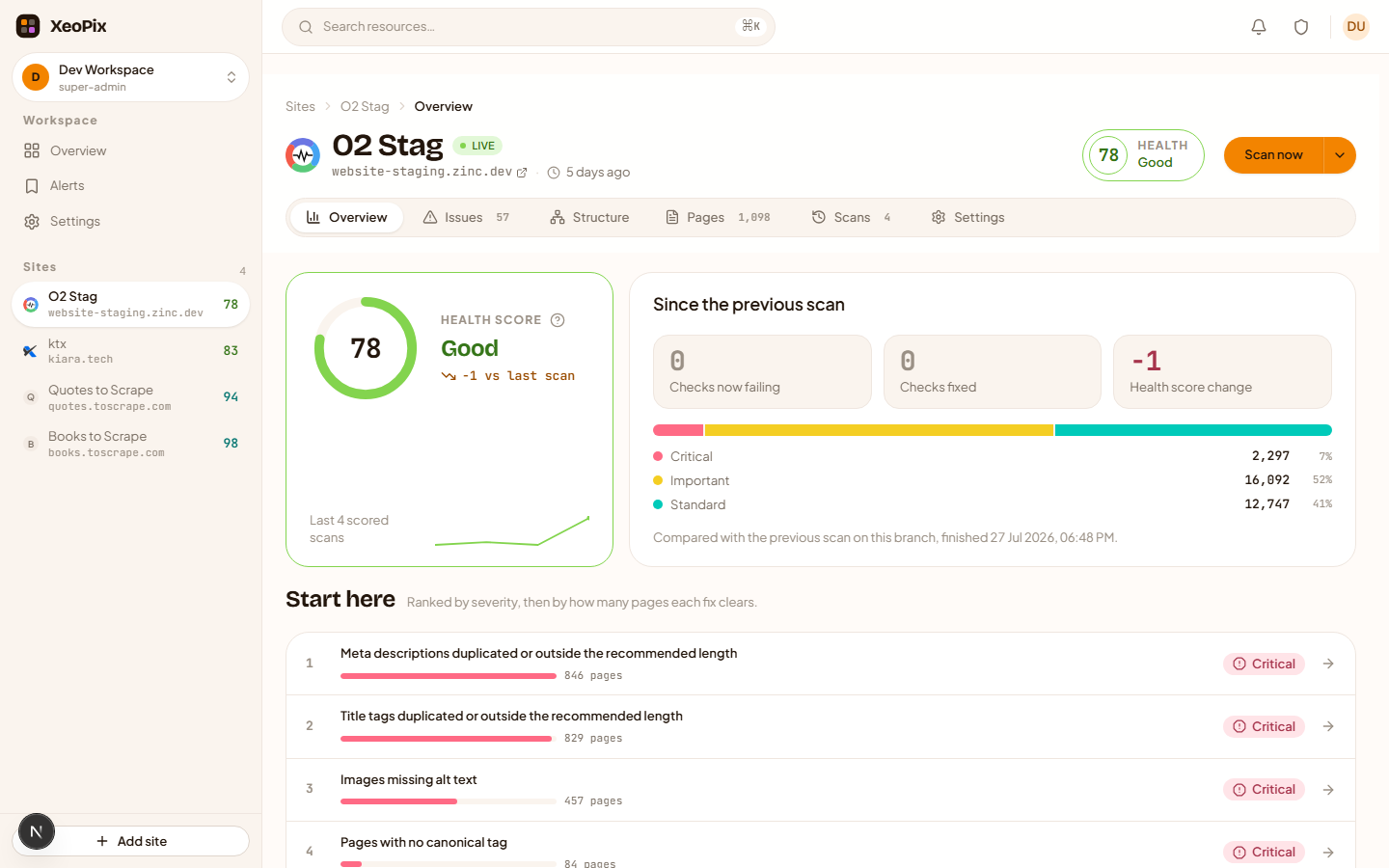
Auditing tells you today. Monitoring tells you what changed.
Auditing tells you the state of your site today. Monitoring tells you what changed since the last time it was fine — which is the only question you can act on.
Establish a baseline
The first crawl records every page and runs all 112 checks. That run is the reference point — nothing is a "regression" until there is something to regress from.
Re-crawl on a schedule
Daily, weekly or monthly per site, in your timezone. Scanning often is the whole point, which is why it is not metered: no credits to ration, so you never hesitate before a re-scan.
See what changed, not everything
Each scan is compared with the previous one on the same branch and split into new, resolved and regressed. A list of 200 findings you already knew about is noise; the four that appeared this week are the work.
Check a branch before it ships
Scans carry the branch they ran against. A preview deploy is scanned as its own line of history, so it never becomes production's baseline — and you can see what a release would do before it does it.
Fail the build when it matters
Trigger a scan from CI with a per-site token, poll it, and read the result — including a pass/fail against the score threshold you set. Your pipeline decides what to do with that.
What you actually get
Screenshots from the running product, captured by our own test suite — not mockups.
One number, with the reasons underneath it
A site opens on its health score and what changed since the previous scan — new, resolved, regressed — then the counts that explain the number: pages crawled, broken links, missing metadata.
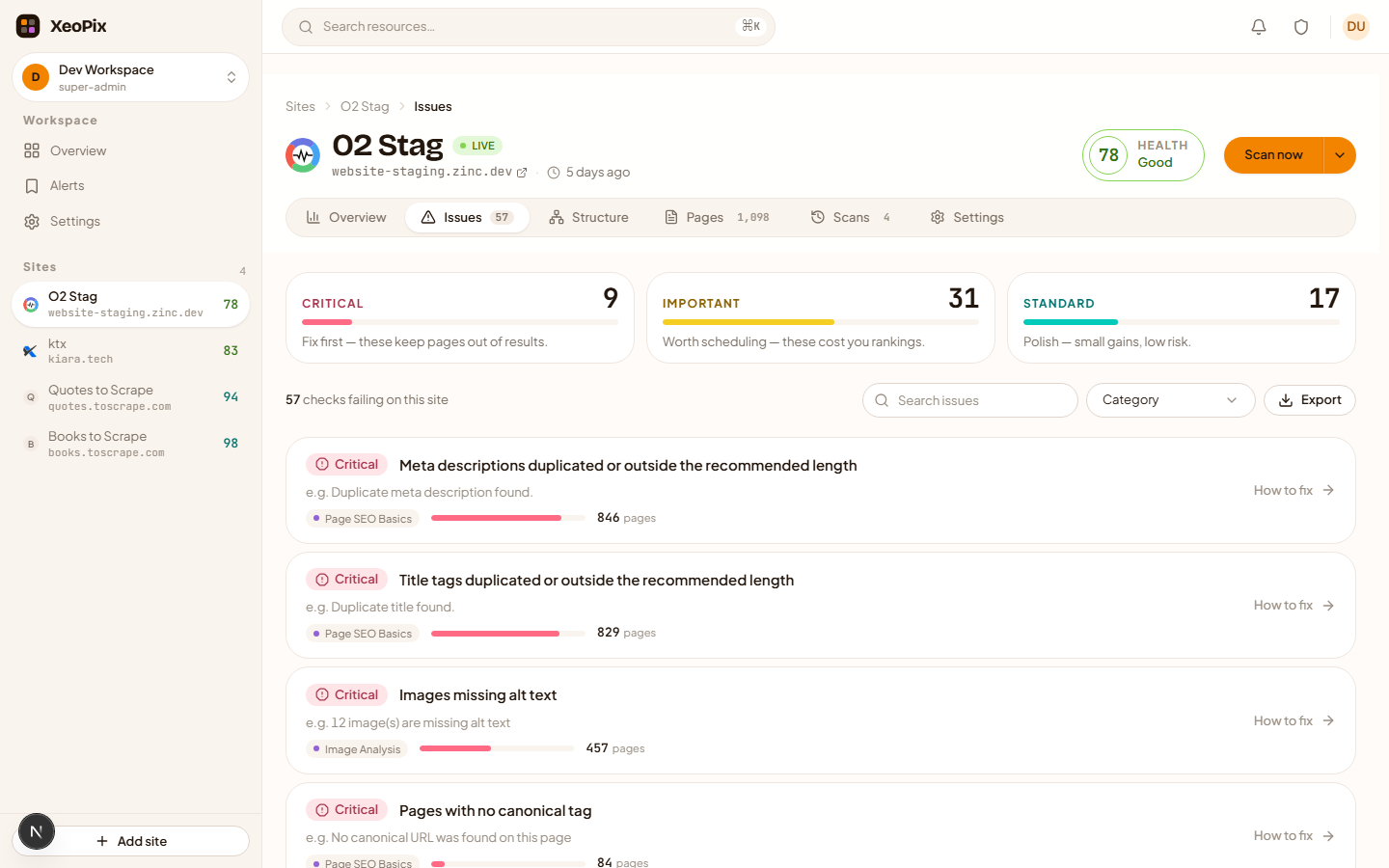
Failing checks, named as failing
Checks are written as the state you want, so the list labels each one as failing and shows the concrete problem underneath — never a row that reads like a pass next to a count of one.
Every check explains itself, in the product
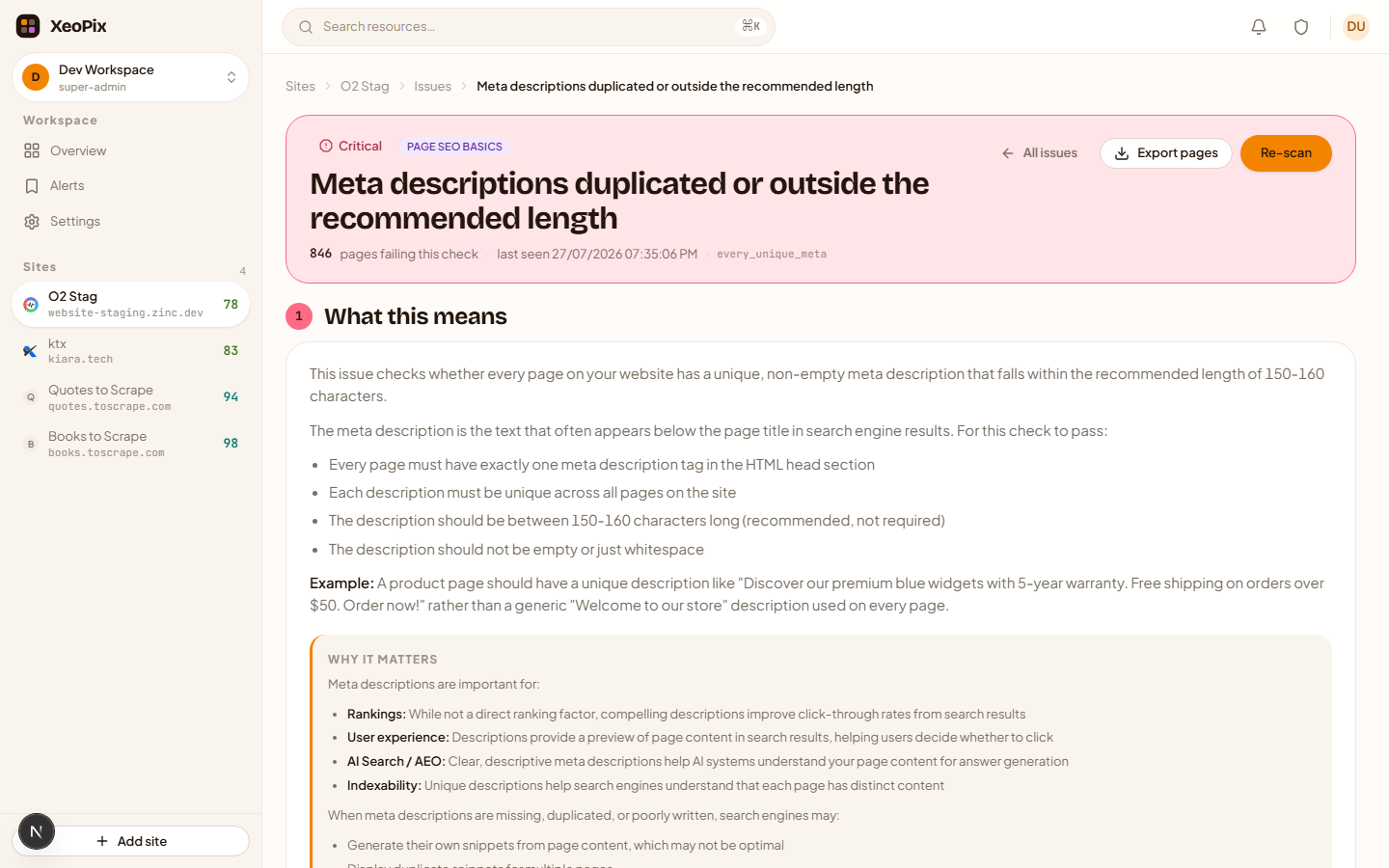
Open a failing check to get what it is, why it matters and how to fix it, alongside every URL that fails it. Export that list, or the whole issue set, as CSV.
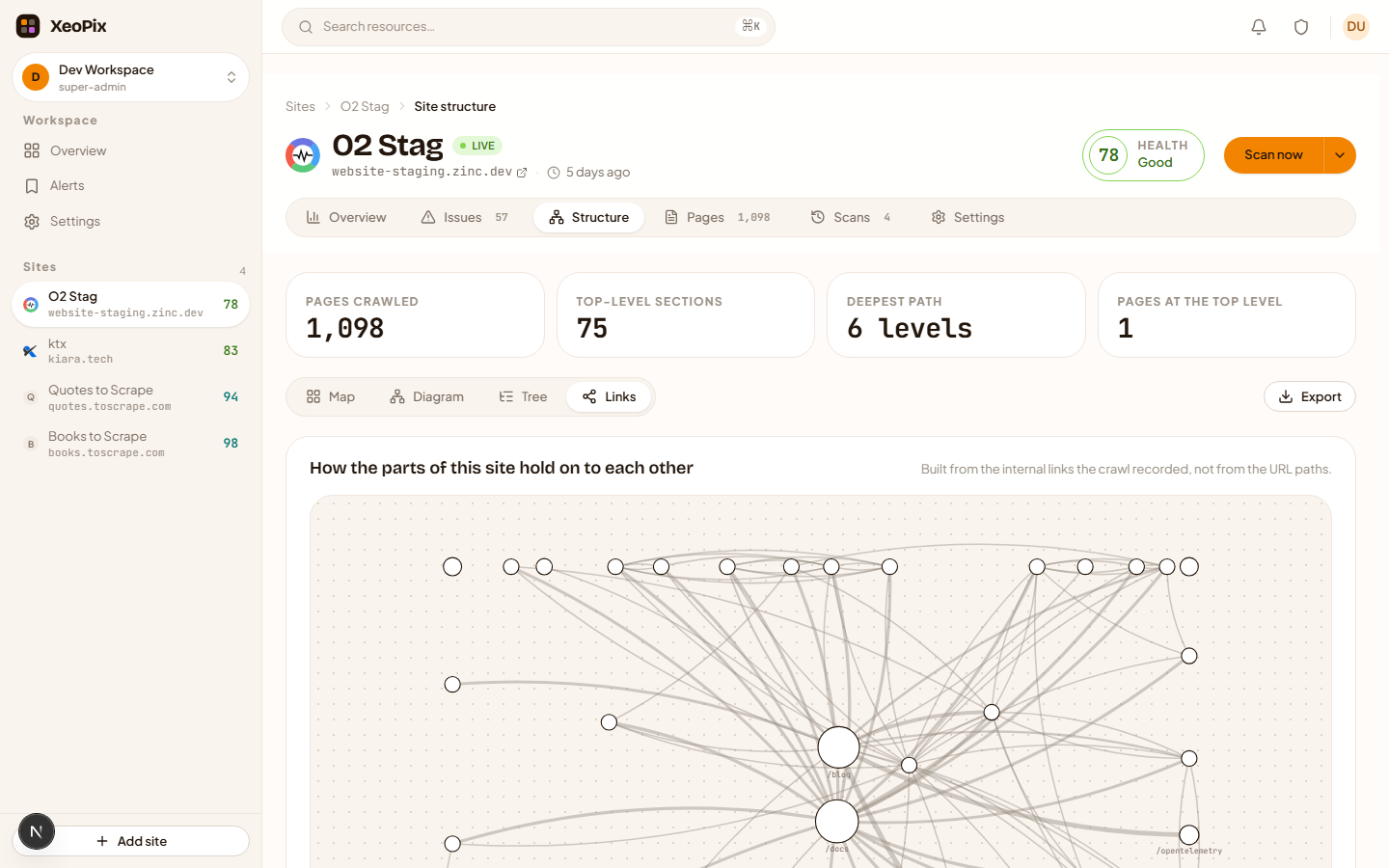
Your site's shape, not a flat list
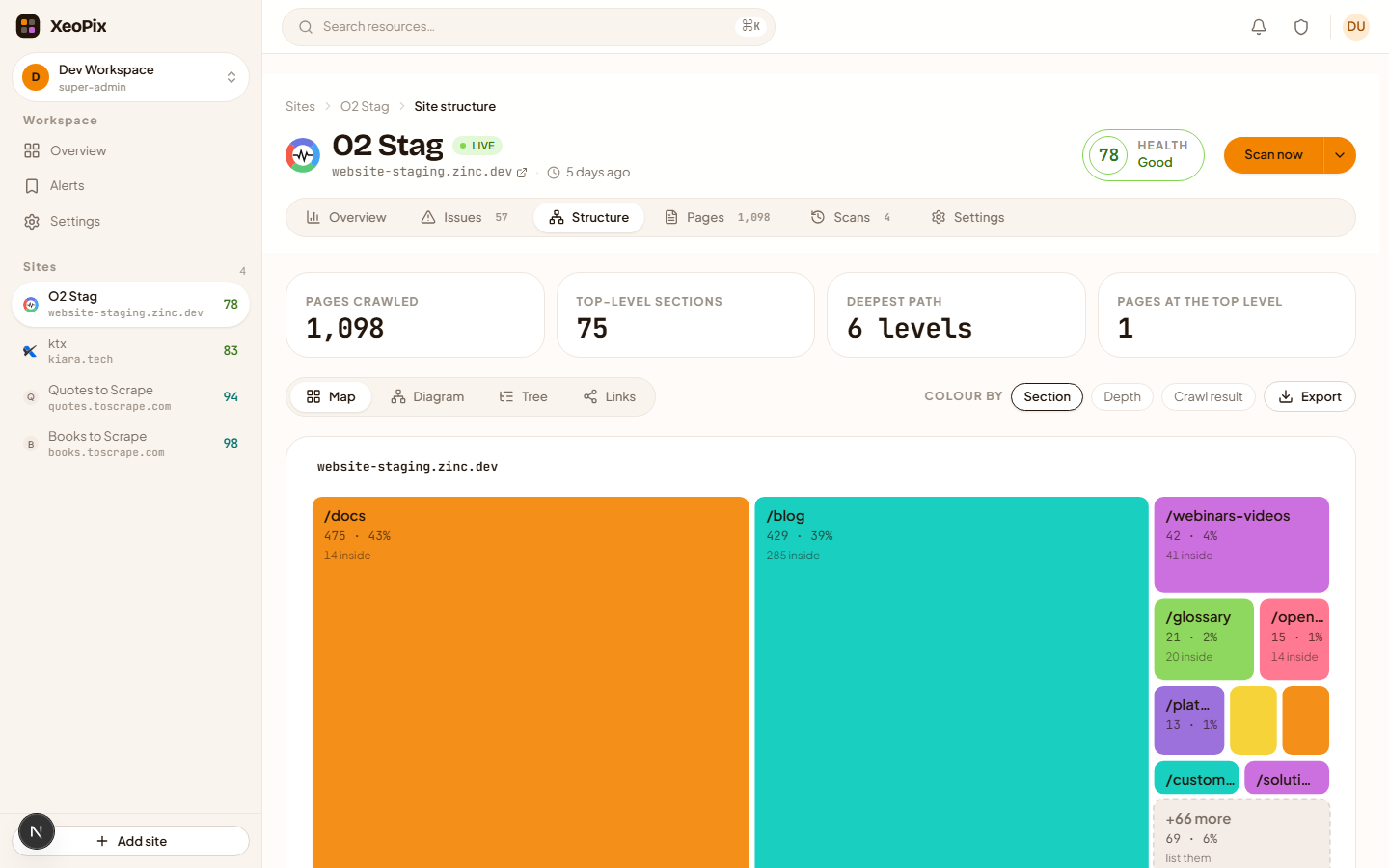
Four drawings of one crawl: a treemap sized by where your pages actually are, a diagram you drag and open branch by branch, an indented tree, and the link graph. All built from the crawl — nothing to configure.
How your pages hold on to each other
The internal link graph, with the site-wide navigation stripped out so what is left is the links you wrote on purpose. Click a section to light up what it points at and what points back.
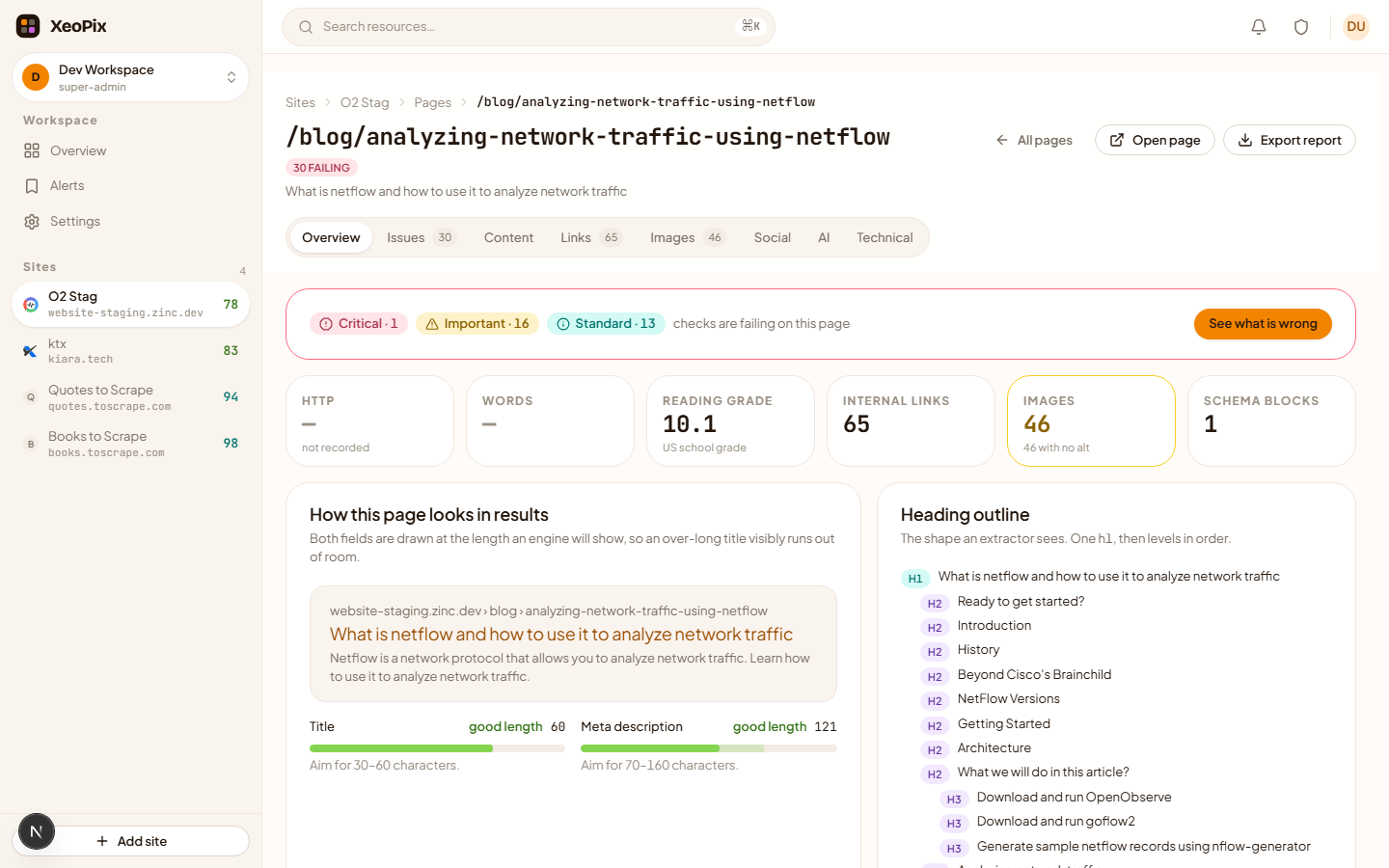
Everything recorded about one URL
Title and meta with their lengths, the heading outline, readability grade, internal and external links with anchor text and status codes, images, structured data, security headers and HTML head.
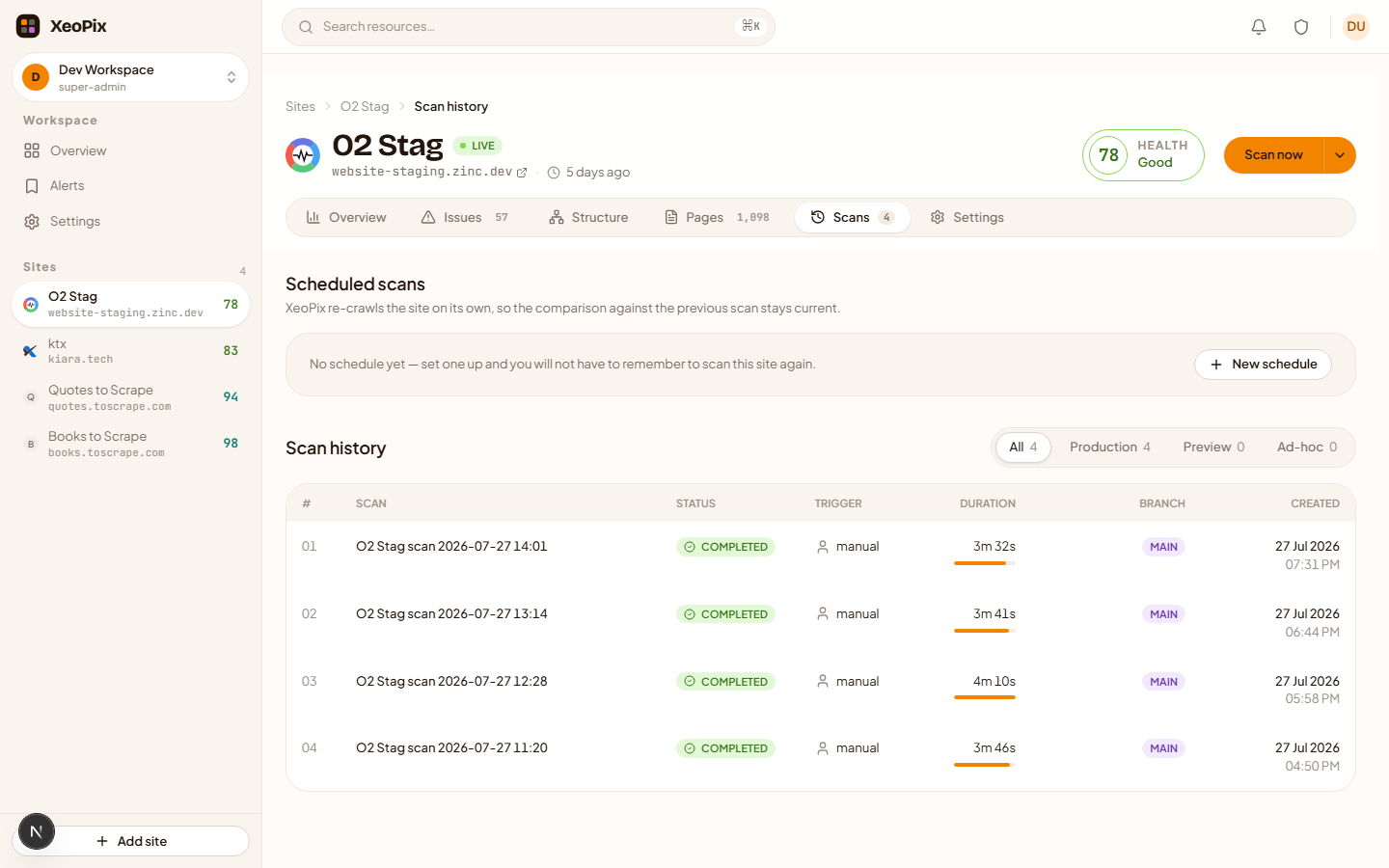
Re-crawls that run without you
A daily, weekly or monthly schedule per site, in your timezone. Scan history keeps every run so you can see when something changed.
Everything it does, and nothing it doesn't
PixyScan is an SEO crawler and checker. It does not measure page speed, track rankings, or watch your competitors — there are good tools for those, and pretending otherwise would only waste your time.
Every finding tied to the exact pages
A scan produces a health score and a list of failing checks by severity. Open any check to see every URL that fails it and what was found on each one — not a percentage with nothing behind it.
A full report for any single page
One URL, everything recorded about it: title and meta with lengths, heading outline, readability grade, internal and external links with their anchor text and status codes, images, JSON-LD, security headers, hreflang and HTML head.
The fix, next to the problem
Each of the 112 checks has a written guide — what it is, why it matters, how to fix it, with examples. It is in the product beside the finding, and on this site.
Every run kept
Scan history is permanent and each run has its own screen: its score, the checks it failed, how long it took and which branch it measured. You can always go back to the run before the one that broke something.
Priced per site, not per seat or per scan
Invite the whole team at no cost — a monitoring tool is more useful the more people watch it. Sites are the thing you are protecting, so sites are what you pay for.
Export anything you can see
The issue list, the pages failing one check, and a single page's full report all export to CSV for a spreadsheet or a client report.
112 checks, in 14 groups you control
Turn a group off for a site and PixyScan stops running it and stops reporting it — scans get faster and quieter. Every check has its own guide.
- Page SEO basics
- Titles, meta descriptions, canonicals, H1–H6 structure, duplicate elements, indexability.
- HTML head tags
- charset, viewport, html lang, robots directives, author, site verification, referrer policy.
- Social & Open Graph
- og: and twitter: tags, image dimensions, locale, article metadata.
- Structured data
- JSON-LD parsed and validated per type — Organization, Product, FAQ, Article, Breadcrumb and more.
- Image analysis
- Alt text, width and height attributes, modern formats, descriptive filenames.
- Semantic HTML
- Whether key regions use real landmarks instead of bare divs, and figures carry captions.
- Content & readability
- Flesch–Kincaid grade level, word count, placeholder text, author attribution.
- Link rel tags
- Favicons, apple-touch-icon, RSS feeds, manifest, AMP links.
- Crawl behaviour
- robots.txt, sitemaps, redirect chains and loops, broken internal links, orphan pages.
- HTTP security headers
- HSTS, CSP, Referrer-Policy, X-Frame-Options, mixed content.
- International SEO
- hreflang pairs, x-default, self-referencing tags, RTL direction, per-language URLs.
- URL parameters
- Whether parameterised and faceted URLs are canonicalised, and canonicals stay clean.
- AEO content signals
- Readability scored for answer engines rather than only for people.
- GEO / AI engine signals
- llms.txt and llms-full.txt presence, and whether GPTBot, ClaudeBot, PerplexityBot, Google-Extended or CCBot are blocked in robots.txt.
What did the last one cost you?
Not rhetorical. Work out your own number — organic revenue per month, multiplied by the share of it that moved, multiplied by the weeks it took to notice.
3–6 weeks
how long a ranking drop typically goes unnoticed
~$4,500
a plausible loss per incident on a $20k/mo organic site
$149/mo
PixyScan Pro, which puts the change in front of you in days
The middle figure is an illustration, not a measurement of your site — that is the point of doing the sum yourself. If your answer is smaller than $149 a month, we are the wrong tool and you should not buy us.
Priced per site, not per scan
No credits. Nothing to ration. Scanning often is the entire point of a monitoring tool, so we never charge you for doing it.
Free — Watch
Solo sites and trials
$0
forever
Production monitoring for one site
- 1 site · 500 pages — included
- Daily scans · 3 on-demand per day — included
- Core checks + internal broken links — included
- 30-day history · 1 seat — included
- External link validation — not included
- Block-the-merge CI check — not included
Starter — Monitor
Small teams with a few sites
$39
per month, billed yearly
$49 billed monthly
More sites, and a re-scan on every deploy
- 3 sites · 2,000 pages each — included
- Twice-daily scans · 20 on-demand per day — included
- All optional check groups — included
- External link validation · deploy webhooksoon — planned, not yet available
- Slack alerts · 90-day history · 3 seatssoon — planned, not yet available
- Block-the-merge CI check — not included
Most popular
Pro — Protect
Teams whose traffic pays the bills
$149
per month, billed yearly
$179 billed monthly
Regression protection in your pull requests
- 10 sites · 10,000 pages each — included
- Hourly + unlimited on-demand scans — included
- Block-the-merge CI check · up to 5 repossoon — planned, not yet available
- External validation up to 50k links per site — included
- Unlimited seats · 1-year history · full API — included
- White-label client portals — not included
Agency — Resell
Agencies managing client sites
$399
per month, billed yearly
$479 billed monthly
Everything in Pro, under your brand
- 30 sites, expandable in packs — included
- White-label reports and client portalssoon — planned, not yet available
- Free read-only seats for every client — included
- Per-client access control and alert routing — included
- CI check across up to 15 repos — included
- Roll-up dashboard across all clients — included
Enterprise
100,000+ pages, scans down to every 15 minutes on core pages, unlimited CI repos, SSO, custom checks, an SLA and a dedicated CSM. Typically $1,500–5,000+ per month.
Talk to salesQuestions people ask first
We already use Semrush or Ahrefs. Why this too?
Keep them. Those are research tools — they tell you what to go after. They will not tell you that last night's deploy dropped the canonical off your category pages. PixyScan watches the site you already have and tells you what changed since it was last fine. Different job, works alongside.
How is this different from a free one-off audit?
An audit is checking for smoke once a year. This is the smoke detector. A single audit gives you a list you will mostly already know; the value here is the second scan and every one after it, because that is when a finding means something changed.
Couldn't a developer script this in an afternoon?
The crawl, yes. What a script does not have is memory of your last ninety deploys, a maintained library of 113 checks as Google shifts, or the judgement to separate a real regression from a cosmetic change. And somebody owns it forever. That is what you are paying us for.
We don't really have SEO problems.
Most teams do not — until a release introduces one and nobody is watching. Connect one site free and leave it for two weeks. If nothing worth knowing turns up, walk away.
Does it measure page speed or Core Web Vitals?
No. PixyScan is an SEO crawler, not a performance tool. It does not run Lighthouse and does not report LCP, INP or CLS. Use PageSpeed Insights or your RUM provider for those.
Will it email me when something breaks?
Not yet, and we are not going to pretend otherwise. Today you see regressions when you open a scan: the comparison against the previous run on the same branch is waiting for you, and scan history keeps every run. Notification delivery is the next thing on this list, not a shipped feature.
Can it stop a bad release from merging?
Partly, and here is the exact line. You can trigger a scan from CI with a per-site token, poll it, and read a result that includes a pass/fail against your score threshold — enough for your pipeline to fail the build. What does not exist is a GitHub app that posts a comment on the pull request or blocks the merge itself. Your script makes that call.
How does it handle JavaScript-rendered pages?
PixyScan reads the server-rendered HTML, which is what a crawler sees first. That is deliberate: several checks exist precisely to catch metadata that only appears after JavaScript runs. If your title is injected client-side, PixyScan will tell you.
Can I scan a preview deploy without ruining my production trend?
Yes — that is what branches are for. Every scan records the branch it ran against, and a scan is only ever compared with the previous scan on the same branch. A preview run never becomes production's baseline.
How is it priced?
Per site. Not per credit, so re-scanning costs nothing extra and you never hesitate before checking. Not per seat, so invite everyone — the tool is more useful the more people watch it.